SOLOPUP · MIT OPEN SOURCE · v2.0.0-rc.5 PUBLIC PREVIEW
Install and try subtitle review
Start with existing subtitles before configuring cloud AI. These steps run the local editor; the included silent demo tests controls, not recognition quality.
Download rc.5 previewTry existing subtitles
1. Download and prepare
Download the Public.zip release asset, extract it and open a terminal in the application folder. Install Python 3.9+ (3.11+ recommended), FFmpeg/ffprobe and a modern browser. Initial dependency installation needs internet access. macOS has been tested locally; equivalent Windows/Linux manual acceptance is incomplete.
2. Generate the demo and start
python3 bootstrap.py --install
.venv/bin/python scripts/doctor.py --json
.venv/bin/python scripts/make_demo.py
.venv/bin/python start_workbench.py --video examples/demo/generated/demo.mp4 --standard-srt examples/demo/normal.srt --sdh-srt examples/demo/sdh.srt --port 8877
On Windows use .venv\Scripts\python.exe instead of .venv/bin/python. The generated demo video is silent and synthetic; its captions illustrate editing controls, not spoken content or recognition accuracy.
3. Open the project page
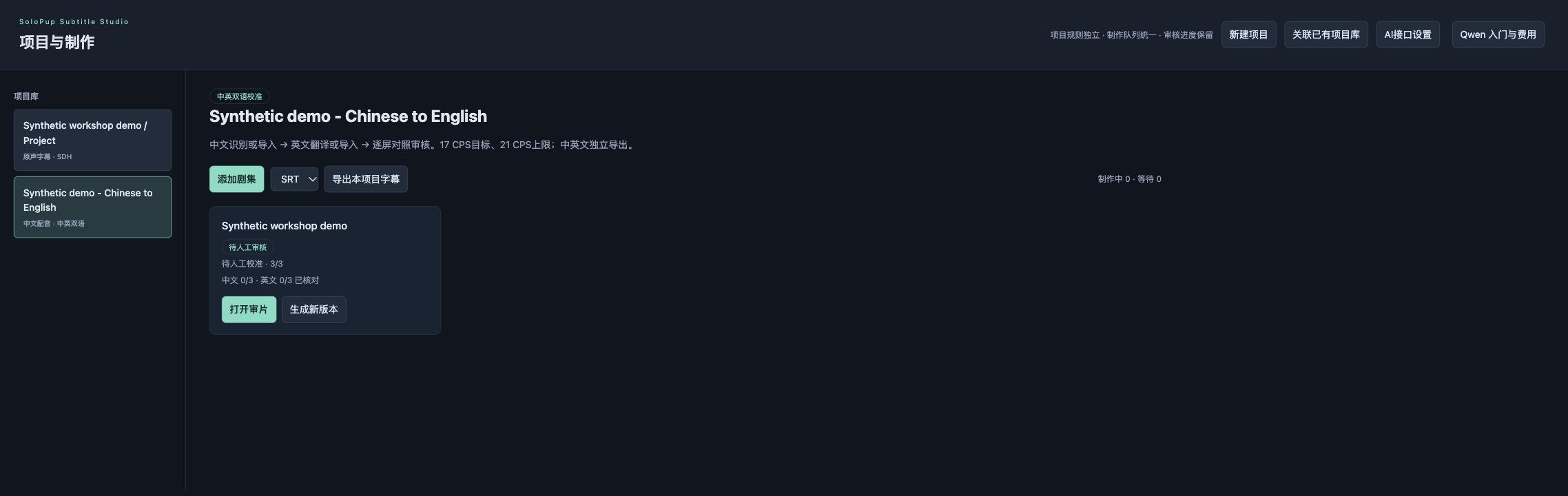
Open http://127.0.0.1:8877/projects in your browser. Startup may first open the seed editor; “项目与制作” returns to the project page. Keep the terminal/server running. Create a project, choose subtitles/SDH or Chinese-audio bilingual localization, then add your video.
4. Review existing subtitles offline
For bilingual review import matching Chinese and English SRT screens and timings. With both files, no API key or cloud processing is needed. With only Chinese SRT, automatic translation needs a configured text model. Without Chinese SRT, optional local transcription needs the separate ASR setup below. A script never replaces the final audio.
5. Save, export and back up
Replay cues, edit, save and export the desired track as ITT or SRT. Bilingual files retain the original video name plus language suffixes. Back up Subtitle_Library/, Subtitle_Projects/ and linked media together. Moving media to another machine does not automatically repair its paths; changing a video master requires a fresh timing check.
Optional local Chinese ASR
Install only if you need automatic local transcription. It is unnecessary for the paired-SRT workflow.
.venv/bin/python -m pip install -r requirements-asr.txt
.venv/bin/python -c "from faster_whisper import WhisperModel; WhisperModel('small', device='cpu', compute_type='int8')
The second command downloads multilingual model weights on first use and needs network access and disk space. Once cached, local recognition can run offline. For direct CLI transcription use --language zh --model small rather than the English-only default. Installing/downloading models is separate from paid API generation.
Before cloud AI production
Read Qwen setup and trial-to-production guidance. Enter your own key via local settings or configure_qwen.command. Saving does not call a model or verify account access. Cloud jobs without a configured key are rejected before queueing. Assess a short dialogue sample before preparing billing and budget for batch work. A local format check does not replace human or platform acceptance.
Try before installing / 先体验,再安装
Edit a browser sample / 在线改一条字幕 · Choose the right download / 选择下载 · Commands for your OS / 按系统安装 · English control key · Search all resources / 搜索资源
This browser sample is a separate learning sandbox with invented text, not the full application. / 在线示例为独立教学体验,非完整工作台。