SOLOPUP · PUBLIC PREVIEW rc.5 · FREE LOCAL REVIEW
An English key to the Chinese controls.
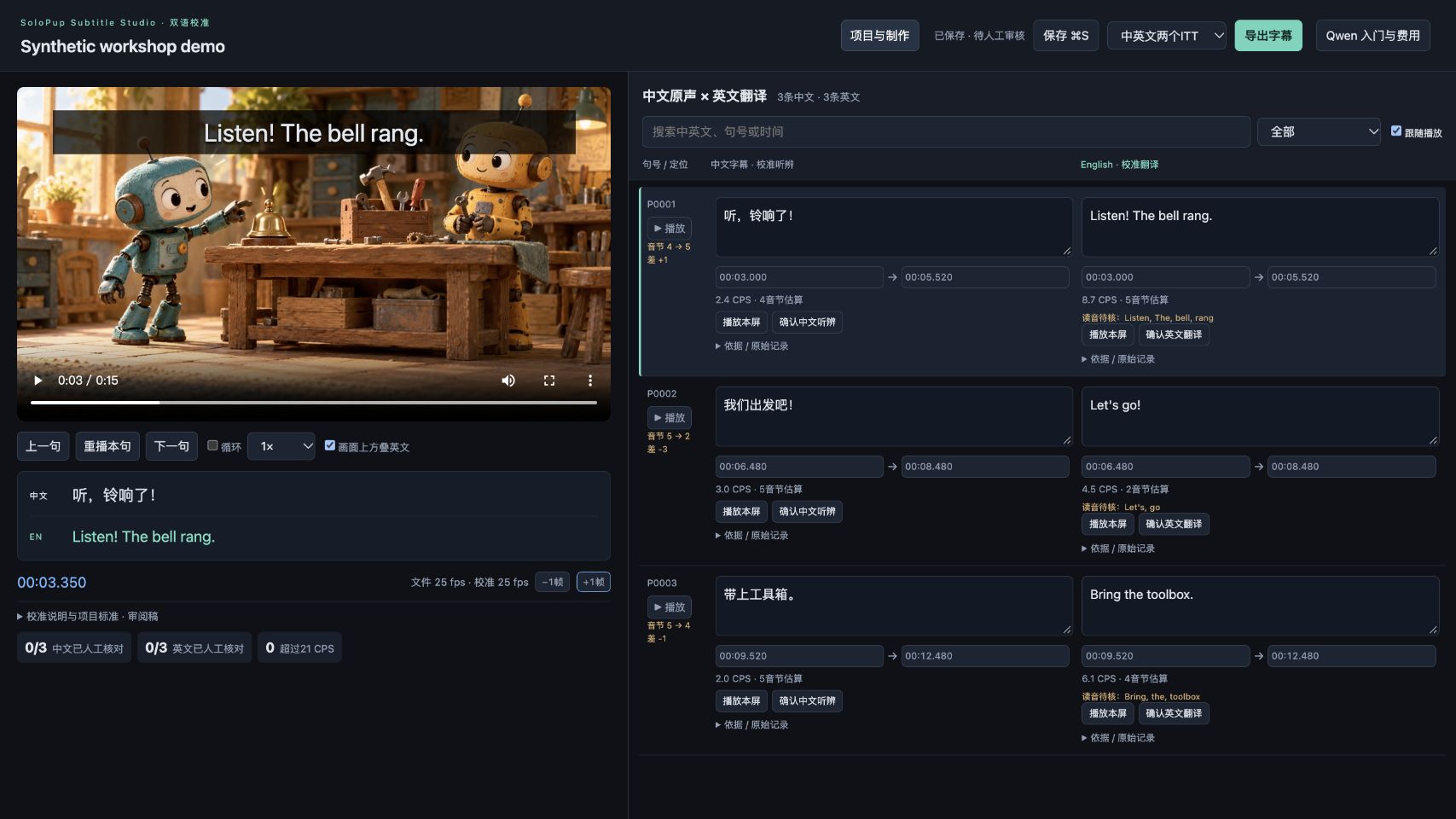
Keep this beside the local editor. The rc.5 bilingual editor and project hub use Chinese labels; this page does not translate the application.
Interface language is separate from subtitle language. English documentation and English subtitle support do not mean the entire UI is localized.
| Visible label | Meaning | Use it to… |
|---|---|---|
| 项目与制作 | Projects and production | Return to the project hub; keep the local server running. |
| 新建项目 | New project | Create a separate project before importing media. |
| 制作方式 | Workflow | Choose original + SDH, or Chinese audio → Chinese/English subtitles. |
| 原声字幕与SDH | Original subtitles and SDH | Two caption types; this is not the bilingual translation workflow. |
| 中文配音 → 中英双语字幕 | Chinese audio → Chinese/English subtitles | Choose this for paired Chinese-source / English-translation review. |
| 添加剧集 | Add episodes | Import your local media and available subtitle tracks. |
| 保存 ⌘S | Save | Saves edits; does not by itself approve translation or audio evidence. |
| 上一句 / 下一句 | Previous / next cue | Move between subtitle screens. |
| 重播本句 | Replay this cue | Check the words against the actual audio and picture. |
| 导出字幕 | Export subtitles | Choose the needed track and format in the export dialog. |
| 导出本项目字幕 | Export project subtitles | Project-hub export uses the format selector beside this button. |
| AI接口设置 | AI provider settings | Optional cloud setup. Skip it when importing both existing SRT tracks. |
One safe first route
- Open
http://127.0.0.1:8877/projects. - Choose 新建项目, then the Chinese-audio bilingual workflow.
- Use 添加剧集 with a video and matching Chinese and English SRTs. This path needs no AI key.
- Review one cue, use 保存 ⌘S, then 导出字幕.
Bilingual UI source · Project-hub source · Installation helper